
Frequently Asked Questions.
Be Safe helps organizations protect employees working alone, remotely, after hours or in areas with limited cellular coverage. Explore common questions about worker check-ins, human monitoring, emergency response, privacy, satellite-device compatibility, gas detection, reporting and implementation.
About Be Safe
Be Safe is a lone-worker safety platform that combines configurable check-ins, location visibility, emergency alerts, escalation procedures and 24/7 human monitoring. It helps organizations maintain contact with workers and respond when assistance may be required.
Be Safe is designed for organizations with employees working alone, remotely, after hours or in higher-risk environments. This can include energy, utilities, municipalities, environmental services, construction, transportation, agriculture, hospitality and field-service teams.
No. Be Safe supports an organization’s established safety and emergency-response procedures. Each implementation is configured around the organization’s workers, risks, contacts and escalation requirements.
Worker Check-Ins
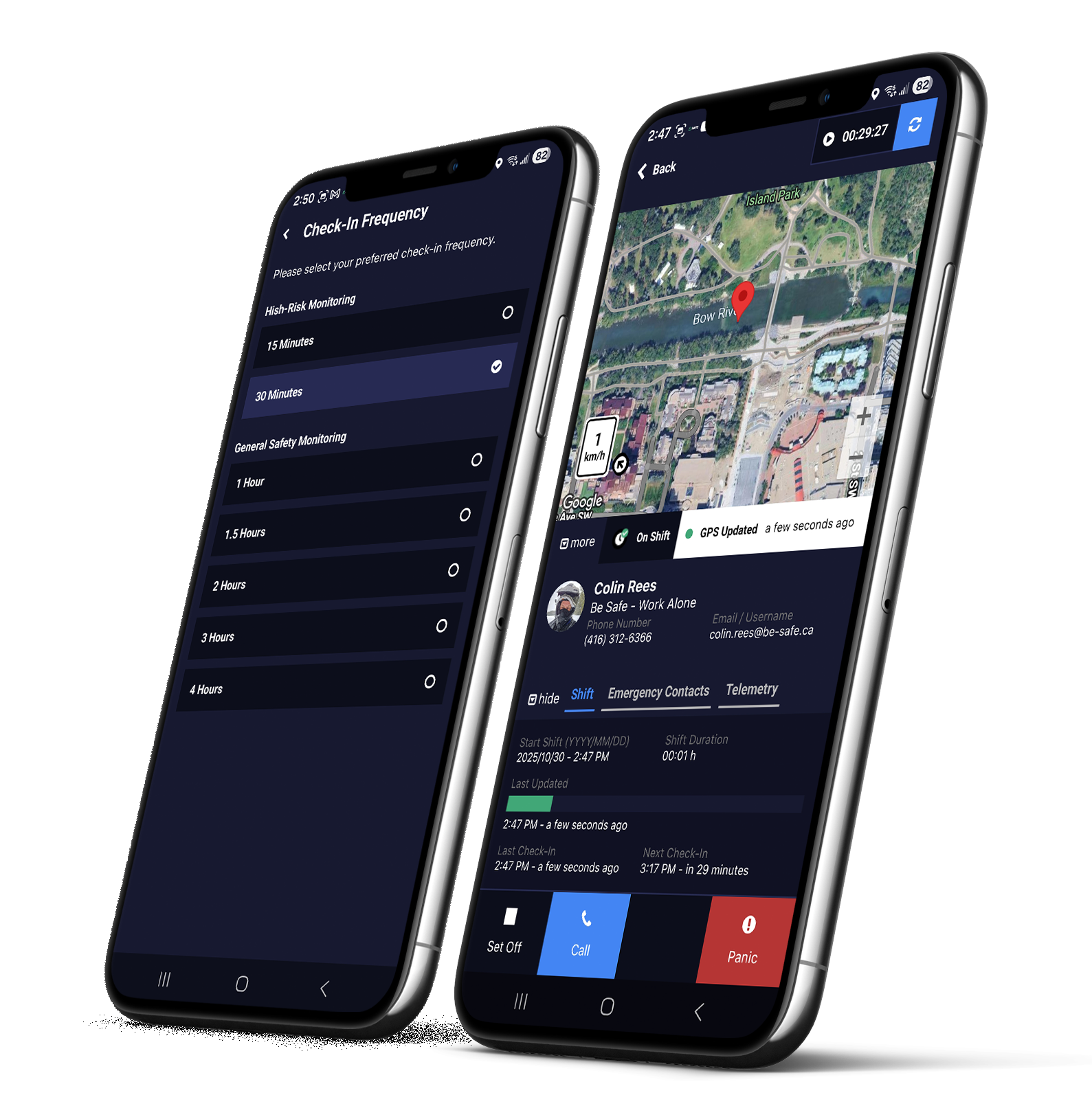
Workers begin an active shift and complete check-ins at scheduled, configurable intervals. Shifts, check-ins and panic alarms can be managed using the Be Safe App for iOS and Android, and compatible GPS communicators, such as Garmin inReach and Zoleo devices. If a check-in is missed, Be Safe initiates the organization’s defined alert and escalation procedure.
Yes. Check-in requirements can be configured to reflect different roles, schedules, locations and levels of risk.
Yes. The Be Safe app automatically checks in for an on-shift worker or supervisor if they’re driving. As part of Be Safe’s safety-first philosophy, drivers should not be required to interact with their phone while driving, or stopped at an intersection. The Be Safe app intuitively accounts for driving, intersections and low driving speeds.
A missed check-in triggers the configured response procedure. Depending on the organization’s setup, this includes automated notifications to remind users to check in, manual attempts to contact the worker by a Be Safe Operator, alerts to designated supervisors and manual escalation to additional response contacts by a Be Safe Operator. Be Safe automatically issues a non-emergency welfare check if no contact is made during the escalation process.
Yes. The available Panic function allows remote workers and supervisors to initiate a silent alert without waiting for the next scheduled check-in. Available features may depend on the worker’s device, operating system, connectivity and system configuration. Panic alerts are treated as emergencies, and follow a dedicated escalation procedure.
Monitoring and Emergency Response
Yes. Be Safe includes 24/7 human monitoring. Trained monitoring personnel respond to missed check-ins, panic alerts and other configured events according to the organization’s established escalation procedure.
With an alert-only configuration, notifications are sent to the organization’s internal designated contacts. Any emergency and response relies on these contacts to view the alert and initiate response in a critical timeframe.
With managed monitoring, trained monitoring personnel receive alerts and follow the organization’s documented response procedure around the clock. The critical response time is often much less than the alert-only configuration, increasing the chance that life-saving support is provided.
No. Search and rescue and emergency services are delivered by the appropriate local authorities or third-party emergency responders. Be Safe Operators may provide operational support by relaying key information and telemetry to the responding parties.
Satellite communicators such as Garmin and Zoleo have dedicated SOS services and emergency response channels. Those services are separate from Be Safe.
Be Safe Operators receive the information needed to assess and escalate an alert. This may include the worker’s name, available on-shift or last known location information, alert type, contact details and approved response instructions. Supervisor users using Be Safe have monitoring capabilities via the Be Safe mobile app, and supervisor dashboard web app.
Location and Privacy
No. Be Safe provides safety-related location visibility during an active “work alone” shift. Be Safe is not intended or designed for off-shift employee monitoring or tracking.
The precise collection and display of location information depend on system configuration, device permissions, operating-system settings and network availability.
Authorized supervisors may be able to view available location information while a user on their team is active on shift. Access is controlled through the organization’s account and should be managed according to its privacy and workplace policies.
When a Be Safe user has ended their shift on the Be Safe – Work Alone app, Be Safe ends monitoring, and the mobile device suspends location and telemetry updates, check-in reminders are cancelled, and device permissions are no longer required.
No location technology works perfectly in every environment. GPS accuracy and availability can be affected by the device, operating system, permissions, buildings, terrain, weather, network conditions and satellite visibility.
Cellular and Satellite Connectivity
Yes. Be Safe is optimized for ultra-constrained networks such as the Starlink Cellular network, available in Canada and the US via Rogers Satellite and T-Satellite respectively. For ultra-remote use cases, and/or for organizations using Garmin and Zoleo satellite communicators, Be Safe uses a proprietary integration to provide core functionality through these devices. Functions include: Start shift, Check-in, Panic/SOS, End Shift, as well as 2-way messaging through the Be Safe Supervisor Dashboard. 2-Way messaging routes to the satellite network by default when a user starts a shift with a compatible satellite communicator; enabling both supervisors and Be Safe Operators to communicate with their remote team members directly. Chats are accessible via the Garmin and Zoleo companion apps.
Be Safe can support certain remote-worker workflows through compatible satellite devices and services. Available functionality varies by device, service plan, network availability, operating system, integration and environmental conditions.
Not every function available over cellular or Wi-Fi will necessarily be available through a satellite-connected device.
Be Safe is a lone-worker safety platform that can support compatible satellite-enabled workflows with cellular satellite service, and handheld satellite communicators. It does not turn every smartphone into a satellite communicator. Satellite connectivity depends on compatible hardware, network service and configuration.
Yes. Direct-to-cell satellite availability depends on the mobile carrier, device, operating system, location, service plan and supported satellite network.
Where compatible direct-to-cell service is available, smartphone connectivity for internet access and text messaging may be available outside of terrestrial cellular coverage. Available Be Safe functions must be confirmed for the specific device, carrier and deployment.
Be Safe supports workflows involving certain compatible satellite communicators, including services such as ZOLEO Location Share, and Garmin LiveTrack. Compatibility and available functions vary by device model, subscription, integration and deployment.
Garmin and other satellite devices may provide their own messaging, tracking or SOS services. Those third-party services are separate from Be Safe unless a specific integration or workflow has been confirmed.
Contact Be Safe to review the devices and communication services used by your organization.
No. SOS services supplied by a satellite-device provider operate under that provider’s network, terms and emergency-response procedures. Be Safe monitoring and escalation are separate services, providing notifications and updates to the client organization’s emergency contacts.
Be Safe only handles panic/SOS when initiated through the Be Safe app, or if an emergency is detected during an escalation call with a Be Safe Operators
Gas Detection
Yes. Be Safe can support integrations with compatible connected gas-detection systems, including supported RKI equipment. This can help make qualifying gas readings or alarms visible within a broader worker-safety and response workflow.
A supported gas alarm can trigger notifications or escalation according to the organization’s configured procedures. Available information and response options depend on the detector, connectivity, integration and system configuration.
No. Be Safe provides portable gas detectors compatible with the Be Safe app. Be Safe does not provide service, repairs, or warranty support for gas detection hardware, as these are provided by the manufacturer and/or designated service providers.
Supervisors and Reporting
Depending on their permissions and system configuration, supervisors can manage workers, shifts, check-in requirements, alerts, escalation contacts and reporting.
Be Safe delivers comprehensive monthly shift reports to supervisors to help manage compliance, risk and incident follow-up. Supervisor also have access to detailed on-demand reporting by user and/or group when detailed safety logs are required. Reporting may include check-in activity, shift records, alerts, incidents and escalation events. Available reports may depend on the organization’s configuration and service level.
Yes. Be Safe can help organizations maintain records of worker check-ins, alerts and response activity. These records may support internal reviews, audits, investigations and occupational health and safety documentation. Be Safe reports are designed to deliver key supporting data and logs to help demonstrate an organization’s duty of care to safety, helping relieve the organization of potential fallout following a related safety incident.
Organizations remain responsible for determining risk, risk mitigation, which legislation, regulations and industry standards apply to their operations.
Yes. Automated alerts, check-in schedules, emergency contacts and response procedures can be configured for different roles, teams, individuals, locations and risk levels. Be Safe follows internal best practices to help ensure service level consistency. Configuration support is available as-needed for all Be Safe clients. Any changes to Be Safe escalation and response procedure require approval from Be Safe leadership.
Implementation and Support
Setting up Be Safe for an organization can generally be completed in one business day. Included setup, training, troubleshooting and support for all new users is available as-needed. For larger organizations, full onboarding can take about one week.
Implementation time depends on the organization’s size, number of workers, required configurations, devices, integrations and response procedures. Be Safe works with each organization to plan setup, onboarding and deployment.
Implementation can include:
- Reviewing worker roles and operating environments
- Defining check-in and escalation procedures
- Configuring workers, supervisors and response contacts
- Reviewing device and connectivity requirements
- Setting up compatible integrations
- Training administrators, supervisors and workers
- Testing alerts and response procedures
Yes. Training and onboarding support is provided to all users via PDF guides, short videos, and on-demand support to help administrators, supervisors and workers understand the system, their responsibilities, and how to best use Be Safe based on their roles and environments.
Yes. Be Safe complements and integrates with an organization’s existing lone-worker policies, escalation procedures, teams and reporting needs.
Pricing
Pricing is provided by quotation. Costs depend on factors such as the number of workers, required monitoring, system configuration, devices, integrations and implementation needs. Be Safe prioritizes safety, and cost of ownership by using a modern usage-based billing model; reducing the need for constant administration when transitioning between busy and slow seasons.
Yes. Enterprise pricing may include:
- Pricing based on workforce size and deployment requirements
- Configurations for multiple teams, locations or operating divisions
- Integration and implementation planning
- Customized onboarding, monitoring and support requirements
Usage-based pricing is available depending on the deployment and service requirements. A quotation can provide an estimated cost based on the number of supervisors and monthly active workers.
Contact Be Safe for a quotation based on your organization’s workforce, risks and operating environment.
Compliance and Security
No single product can guarantee compliance. Be Safe provides tools that can support an organization’s lone-worker procedures, monitoring, recordkeeping and response processes.
Each organization remains responsible for understanding and meeting the legal and regulatory requirements that apply to its jurisdiction and industry.
Yes. Be Safe supports organizations operating in multiple regions including Canada and the US, but device compatibility, cellular and satellite coverage, emergency services, privacy requirements and regulations vary by location.
Deployment should be reviewed for each country, jurisdiction and operating environment.
Still Have Questions?
Every organization has different workers, risks, devices and response requirements. Contact Be Safe to discuss your operation and receive a customized safety assessment.
Lone Worker Safety Built for Real Operations
Improve Compliance & Worker Safety
From field services to remote operations, Be Safe helps teams respond faster and work smarter.